上下文和辅助工具
上下文为应用程序的当前请求提供额外的和可选的信息。
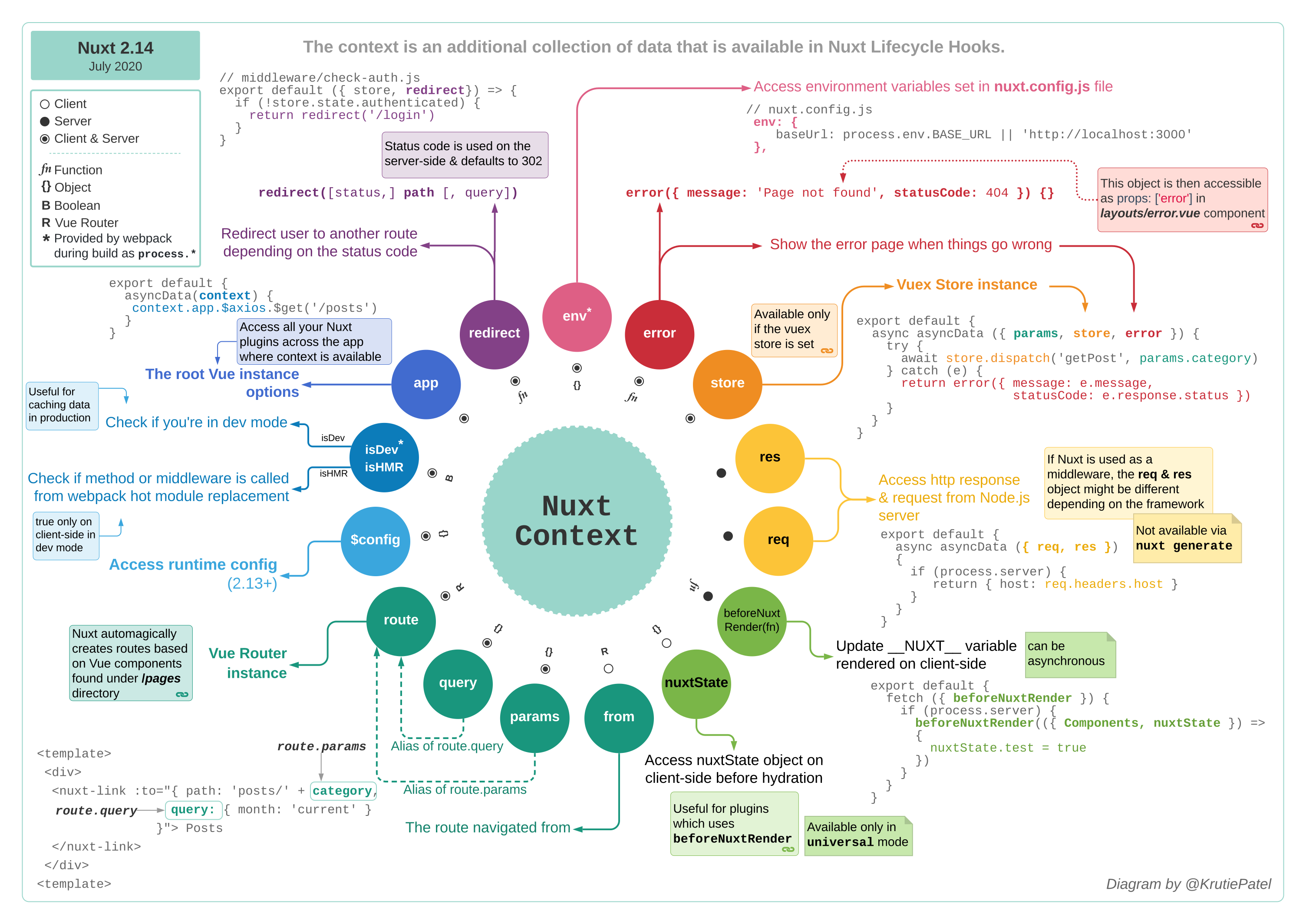
context 对象可在特定的 Nuxt 函数中使用,如 asyncData 、plugins 、middleware 和 nuxtServerInit 。它为应用程序的当前请求提供额外的和可选的信息。
首先,上下文用于提供对 Nuxt 应用程序其他部分的访问(例如 Vuex store 或底层 connect 实例)。因此,服务端和 store 中可用的 req 和 res 对象始终可用。但随着时间推移,上下文扩展了许多其他有用的变量和快捷方式。现在可以访问 development 模式下的 HMR(热模块重载/替换)功能、当前 route、页面 params 和 query,还可以通过上下文访问环境变量。此外,模块函数和辅助工具可以通过上下文公开,在客户端和服务端都可使用。
默认存在的所有上下文键
function (context) { // asyncData, nuxtServerInit, ...
  // 始终可用
  const {
    app,
    store,
    route,
    params,
    query,
    env,
    isDev,
    isHMR,
    redirect,
    error,
   $config
  } = context

  // 仅在服务端可用
  if (process.server) {
    const { req, res, beforeNuxtRender } = context
  }

  // 仅在客户端可用
  if (process.client) {
    const { from, nuxtState } = context
  }
}
有关其他上下文键的更多信息,请参阅上下文文档 。
使用页面参数进行 API 查询
上下文通过 context.params 直接公开路由的可能动态参数。以下示例使用 URL 的一部分作为动态页面参数,通过 nuxt/http 模块调用 API。nuxt/http 模块可以通过 context.app 对象公开自己的函数。
此外,将 API 调用包装在 try/catch 语法中以处理潜在错误。使用 context.error 函数可以直接显示 Nuxt 的错误页面并传入发生的错误。
export default {
  async asyncData(context) {
    const id = context.params.id
    try {
      // 在此使用 nuxtjs/http 模块,通过 context.app 公开
      const post = await context.app.$http.$get(
        `https://api.nuxtjs.dev/posts/${id}`
      )
      return { post }
    } catch (e) {
      context.error(e) // 显示 nuxt 错误页面并传入抛出的错误
    }
  }
}
使用 ES6 可以解构上下文对象,传入想要访问的对象,无需使用 context 关键字即可在代码中使用它们:
export default {
  async asyncData({ params, $http, error }) {
    const id = params.id

    try {
      // 在此使用 nuxtjs/http 模块,通过 context.app 公开
      const post = await $http.$get(`https://api.nuxtjs.dev/posts/${id}`)
      return { post }
    } catch (e) {
      error(e) // 显示 nuxt 错误页面并传入抛出的错误
    }
  }
}
如果想使用查询参数,请使用 context.query.id 。
重定向用户并访问 store
访问 Vuex store (通过 store 目录设置时)也可以通过上下文实现。它提供了一个 store 对象,可以像 Vue 组件中的 this.$store 一样处理。此外,使用通过上下文公开的辅助工具 redirect 方法,在 authenticated 状态为 falsy 时重定向用户。
export default {
  middleware({ store, redirect }) {
    // 从解构对象中获取键
    const isAuthenticated = store.state.authenticated
    if (!isAuthenticated) {
      return redirect('/login')
    }
  }
}
辅助工具
除了上下文中的快捷方式外,Nuxt 应用程序中还有其他小型辅助工具。
$nuxt:Nuxt 辅助工具
$nuxt 是一个旨在改善用户体验并在某些情况下作为逃生舱口的辅助工具。在 Vue 组件中可通过 this.$nuxt 访问,在客户端其他地方可通过 window.$nuxt 访问。
连接检查器
$nuxt 辅助工具提供了一种快速检查用户是否有互联网连接的方法,公开了布尔值 isOffline 和 isOnline。可以使用这些值在用户离线时立即显示消息(如下例所示)。
<template>
  <div>
    <div v-if="$nuxt.isOffline">You are offline</div>
    <Nuxt />
  </div>
</template>
访问根实例
除了提供 DX/UX 功能外,$nuxt 辅助工具还提供了从其他所有组件访问应用程序根实例的快捷方式。不仅如此,还可以通过 window.$nuxt 访问 $nuxt 辅助工具,用作从 Vue 组件外部访问 $axios 等模块方法的逃生舱口。应谨慎使用,作为最后手段。
刷新页面数据
当想要刷新用户当前页面时,不希望完全重新加载页面,因为可能会再次访问服务器并至少重新初始化整个 Nuxt 应用程序。通常只想刷新由 asyncData 或 fetch 提供的数据。
可以使用 this.$nuxt.refresh() 实现!
<template>
  <div>
    <div>{{ content }}</div>
    <button @click="refresh">Refresh</button>
  </div>
</template>

<script>
  export default {
    asyncData() {
      return { content: 'Created at: ' + new Date() }
    },
    methods: {
      refresh() {
        this.$nuxt.refresh()
      }
    }
  }
</script>
控制加载条
使用 $nuxt,可以通过 this.$nuxt.$loading 以编程方式控制 Nuxt 的加载条。
export default {
  mounted() {
    this.$nextTick(() => {
      this.$nuxt.$loading.start()
      setTimeout(() => this.$nuxt.$loading.finish(), 500)
    })
  }
}
详情请参阅加载功能文档 。
onNuxtReady 辅助工具
如果想在 Nuxt 应用程序加载并准备就绪之后运行某些脚本,可以使用 window.onNuxtReady 函数。这在想要在客户端执行函数而不增加站点交互时间时很有用。
window.onNuxtReady(() => {
  console.log('Nuxt is ready and mounted')
})
进程辅助工具
Nuxt 向全局 process 对象注入了 3 个布尔值(client、server 和 static),用于确定应用程序是在服务器还是完全在客户端渲染,以及检查静态站点生成。这些辅助工具在整个应用程序中可用,通常用于 asyncData 用户代码中。
<template>
  <h1>I am rendered on the {{ renderedOn }} side</h1>
</template>

<script>
  export default {
    asyncData() {
      return { renderedOn: process.client ? 'client' : 'server' }
    }
  }
</script>
在此示例中,使用服务端渲染时,用户直接访问页面,renderedOn 将评估为 'server'。当用户从应用程序的另一部分导航到该页面时(例如点击 <NuxtLink>),将在客户端评估。