组件目录
components 目录包含 Vue.js 组件。组件构成页面的各个部分,可以复用并导入到页面、布局甚至其他组件中。
数据获取
要在组件中访问 API 的异步数据,可以使用 fetch() 。
通过检查 $fetchState.pending,可以在等待数据加载时显示消息。也可以检查 $fetchState.error,在数据获取出错时显示错误消息。使用 fetch() 时,需要在 data() 中声明适当的属性,从 fetch 获取的数据可以赋值给这些属性。
components/MountainsList.vue
<template>
  <div>
    <p v-if="$fetchState.pending">Loading....</p>
    <p v-else-if="$fetchState.error">Error while fetching mountains</p>
    <ul v-else>
      <li v-for="(mountain, index) in mountains" :key="index">
        {{ mountain.title }}
      </li>
    </ul>
  </div>
</template>
<script>
  export default {
    data() {
      return {
        mountains: []
      }
    },
    async fetch() {
      this.mountains = await fetch(
        'https://api.nuxtjs.dev/mountains'
      ).then(res => res.json())
    }
  }
</script>
有关 fetch 工作原理的详情,请参阅 fetch() 章节
组件发现
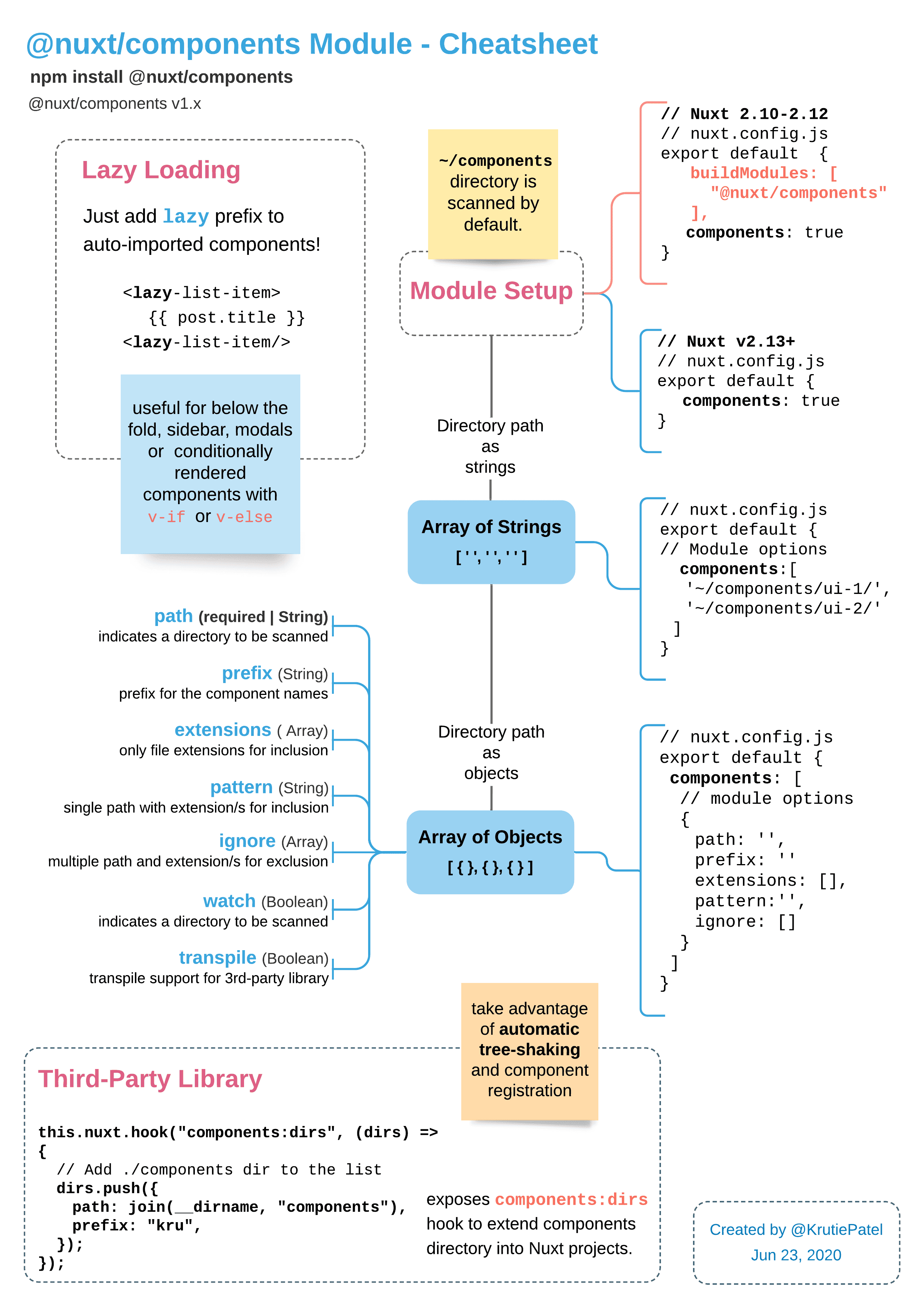
从 v2.13 起,Nuxt 可以在模板中使用时自动导入组件。要激活此功能,请在配置中设置 components: true:
nuxt.config.js
export default {
  components: true
}
~/components 目录中的任何组件都可以在整个页面、布局(和其他组件)中使用,无需显式导入。
| components/
--| TheHeader.vue
--| TheFooter.vue
layouts/default.vue
<template>
  <div>
    <TheHeader />
    <Nuxt />
    <TheFooter />
  </div>
</template>
动态导入
要动态导入组件(也称为组件懒加载),只需在模板中添加 Lazy 前缀。
layouts/default.vue
<template>
  <div>
    <TheHeader />
    <Nuxt />
    <LazyTheFooter />
  </div>
</template>
使用 lazy 前缀,还可以在事件触发时动态导入组件。
pages/index.vue
<template>
  <div>
    <h1>Mountains</h1>
    <LazyMountainsList v-if="show" />
    <button v-if="!show" @click="show = true">Show List</button>
  </div>
</template>

<script>
export default {
  data() {
    return {
      show: false
    }
  }
}
</script>
嵌套目录
如果组件在嵌套目录中,例如:
components/
  base/
      foo/
         CustomButton.vue
组件名称基于其路径目录和文件名,因此组件为:
<BaseFooCustomButton />
如果想保持目录结构但以 <CustomButton /> 使用,请在 nuxt.config.js 中添加 CustomButton.vue 的目录:
nuxt.config.js
components: {
  dirs: [
    '~/components',
    '~/components/base/foo'
  ]
}
然后就可以用 <CustomButton /> 代替 <BaseFooCustomButton />:
pages/index.vue
<CustomButton />
有关控制组件名称的其他方法,请参阅 components 属性 。
了解更多关于 components 模块 的信息。
Edit this page on GitHub
Updated at Tue, Apr 14, 2026