内容目录
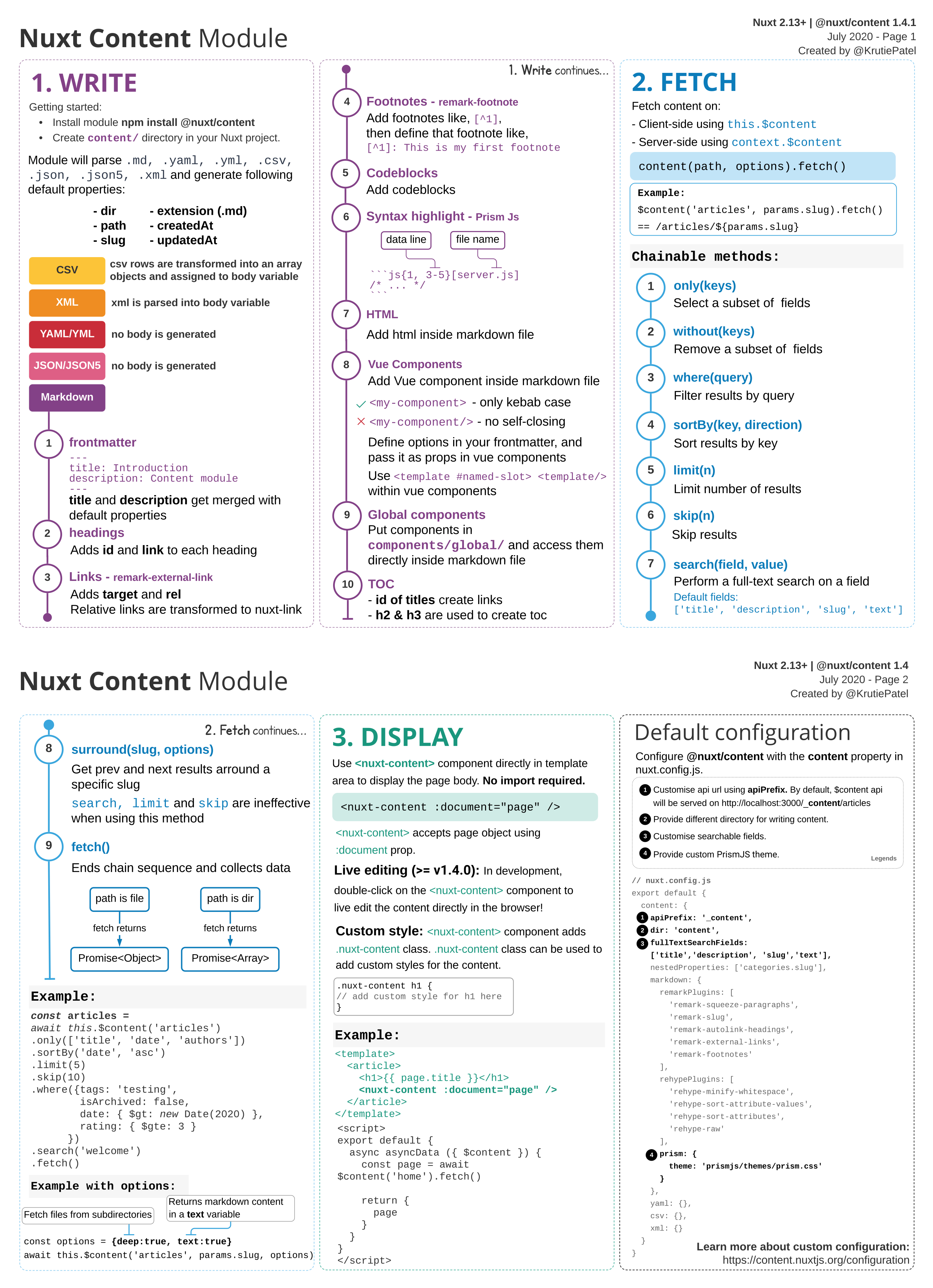
使用 @nuxt/content 模块可以增强 Nuxt 应用程序。该模块可以写入 content/ 目录,并通过类似 MongoDB 的 API 获取 Markdown、JSON、YAML 和 CSV 文件,像基于 Git 的无头 CMS 一样工作。
开发时热重载
由于 Markdown 文件更改时无需通过 webpack,开发时 content 模块的热重载非常快速。还可以监听 content:update 事件并创建插件,这样每次更新 content 中的文件时,例如可以调度 fetchCategories 方法。
显示内容
可以在模板中直接使用 <nuxt-content> 组件来显示页面正文。
<template>
  <article>
    <nuxt-content :document="article" />
  </article>
</template>
内容样式
根据应用程序的设计,可能需要编写一些样式来正确显示 Markdown。
<nuxt-content> 组件会自动添加 .nuxt-content 类,可以用它来自定义样式:
<style>
  .nuxt-content h2 {
    font-weight: bold;
    font-size: 28px;
  }
  .nuxt-content p {
    margin-bottom: 20px;
  }
</style>
处理 Markdown、CSV、YAML、JSON(5)
该模块将 .md 文件转换为 JSON AST 树结构,存储在 body 变量中。还可以在 Markdown 文件中添加 YAML front matter 块,或添加插入到文档中的 .yaml 文件。同样可以添加插入到文档中的 json/json5 文件,以及行被赋值给 body 变量的 .csv 文件。
---
title: My first Blog Post
description: Learning how to use @nuxt/content to create a blog
---
Markdown 中的 Vue 组件
可以在 Markdown 文件中直接使用 Vue 组件,但需要以 kebab-case 引用组件,且不能使用自闭合标签。
<template>
  <div class="p-4 mb-4 text-white bg-blue-500">
    <p><slot name="info-box">default</slot></p>
  </div>
</template>
<info-box>
  <template #info-box>
    This is a vue component inside markdown using slots
  </template>
</info-box>
完全可搜索的 API
可以使用 $content() 轻松列出、过滤和搜索内容。
<script>
  export default {
    async asyncData({ $content, params }) {
      const articles = await $content('articles', params.slug)
        .only(['title', 'description', 'img', 'slug', 'author'])
        .sortBy('createdAt', 'asc')
        .fetch()

      return {
        articles
      }
    }
  }
</script>
上一篇和下一篇文章
content 模块包含 .surround(slug),可以轻松获取上一篇和下一篇文章。
async asyncData({ $content, params }) {
    const article = await $content('articles', params.slug).fetch()

    const [prev, next] = await $content('articles')
      .only(['title', 'slug'])
      .sortBy('createdAt', 'asc')
      .surround(params.slug)
      .fetch()

    return {
      article,
      prev,
      next
    }
  },
<prev-next :prev="prev" :next="next" />
全文搜索
content 模块内置全文搜索,无需安装任何东西即可轻松搜索 Markdown 文件。
<script>
  export default {
    data() {
      return {
        searchQuery: '',
        articles: []
      }
    },
    watch: {
      async searchQuery(searchQuery) {
        if (!searchQuery) {
          this.articles = []
          return
        }
        this.articles = await this.$content('articles')
          .limit(6)
          .search(searchQuery)
          .fetch()
      }
    }
  }
</script>
语法高亮
该模块会自动将代码块包装并应用 Prism 类,也可以使用不同的 Prism 主题或禁用它。
yarn add prism-themes
npm install prism-themes
content: {
  markdown: {
    prism: {
      theme: 'prism-themes/themes/prism-material-oceanic.css'
    }
  }
}
扩展 Markdown 解析
Markdown 原本不支持代码块内的行高亮或文件名,content 模块允许使用自定义语法。行号会添加到 pre 标签的 data-line 属性中,文件名会转换为带 filename 类的 span,可以为其设置样式。
生成目录
TOC(目录)数组属性会插入到文档中,列出所有标题及其标题和 ID,可以链接到它们。
<nav>
  <ul>
    <li v-for="link of article.toc" :key="link.id">
      <NuxtLink :to="`#${link.id}`">{{ link.text }}</NuxtLink>
    </li>
  </ul>
</nav>
强大的查询构建器 API
content 模块内置类似 MongoDB 的强大查询构建器 API,可以在 http://localhost:3000/_content/ 轻松查看每个目录的 JSON。端点可通过 GET 和 POST 请求访问,可以使用查询参数。
http://localhost:3000/_content/articles?only=title&only=description&limit=10
使用钩子扩展
可以使用钩子扩展模块,在保存文档之前向文档添加数据。
与 @nuxtjs/feed 集成
对于文章,content 可以与 @nuxtjs/feed 模块一起使用来生成新闻 feed。
支持静态站点生成
content 模块支持使用 nuxt generate 进行静态站点生成,由于 nuxt 爬虫功能,所有路由都会自动生成。